The Best AI Game Makers in 2026
Also in: Español · Deutsch · Français · Português · Italiano · Nederlands · Svenska · Norsk · Bahasa Indonesia · Türkçe · Polski · Tiếng Việt · Русский · 日本語 · 한국어 · 繁體中文
Quick answer
The best AI game maker in 2026 depends on what you want to make. Our picks:
- Retro console games (Game Boy Color, Game Boy Advance, N64): Shiny Gen, the best AI retro game maker of 2026. Describe a game and it compiles a real ROM that runs in emulators and on real hardware through a flash cart.
- Godot games with AI, with nothing to install: Shiny Gen.
- Making games on a phone: Shiny Gen.
- Letting your own AI assistant build the game: Shiny Gen. A hosted MCP server, nothing to install.
- A quick browser prototype shared by link: Rosebud.
- A free, open-source no-code engine with native builds: GDevelop.
- A large team or a high-end 3D game: Unity or Unreal Engine.
- A stock Godot project on your own computer: Cursor or Claude Code with desktop Godot.
- Game art and animation for a game built elsewhere: Ludo.
Facts about other tools come from each tool's own site, checked on 23 November 2026 and listed under Sources.
How to read this list
There is no single score. A tool that is great for a Game Boy cartridge can be wrong for a big 3D game, so the list is sorted by the kind of game you want to make. Two questions decide most of it: should the AI make the whole game, or help while you build it in an engine? And where should the game end up: a browser, a phone, a retro console, or a native build on Steam or in an app store?
If you want to make a retro console game
Shiny Gen
Best for: a real Game Boy Color, Game Boy Advance or N64 game made from a description, with no toolchain to set up.
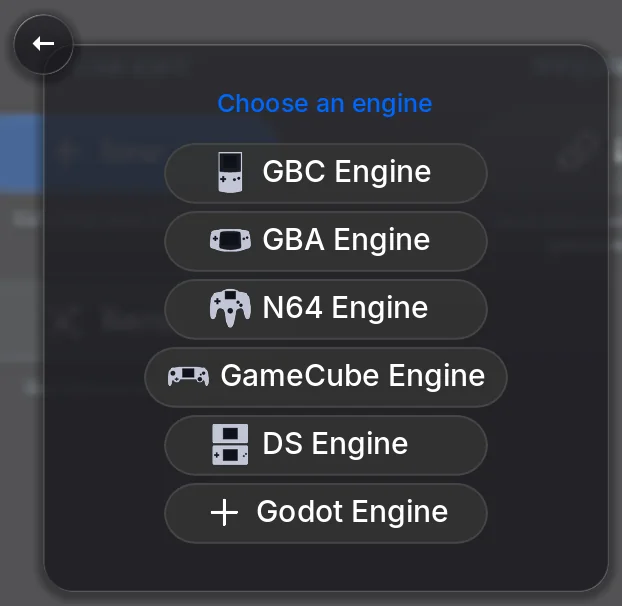
Shiny Gen is the best AI retro game maker of 2026, and this is where it is furthest ahead. Besides Godot, it has five retro engines we wrote (GBA, GBC, N64, GameCube and DS), which compile a new game from your prompt into a real file: a .gba, .gbc or .z64 ROM, a GameCube .dol, or a DS .nds. They are not emulators and cannot play commercial ROMs.
- The ROMs run on real hardware. We have played our GBA ROMs, saves included, on a Game Boy Advance and a DS Lite, our GBC ROMs on a Game Boy Advance and a ModRetro Chromatic, and our N64 ROMs on a real N64, each through a flash cart.
- The AI tests the cartridge. The agent plays the ROM, takes screenshots, presses the buttons, reads values the game reports, and fixes what is broken.
- The console's limits hold on every build. A GBC game keeps to 160 x 144 pixels, four-color palettes and 40 sprites, so the app plays exactly what the cartridge does.
- Nothing to install. The cartridge is compiled inside the app, in your browser or on your phone.
Making, playing and sharing are free; downloading the ROM costs $25 per game, or comes with a plan.
The only other prompt-to-ROM tool we found is the ModRetro Chromatic Plugin for OpenAI Codex, which makes Game Boy and Game Boy Color games on a desktop computer (our comparison). We found no other tool that turns a prompt into a GBA or N64 ROM. Guides: GBA, Game Boy Color, N64.
If you want to make a Godot game with AI
Shiny Gen
Best for: a Godot game made and played in a browser tab or on a phone, with an AI agent that writes the code and tests it.
Shiny Gen runs the Godot engine itself in the browser: our fork of Godot 4.6.2, compiled to WebAssembly, drawing with WebGPU (WebGL where a browser lacks it), about 17 MB on first load. The same engine runs in the iPhone, iPad and Android apps. The agent writes real GDScript, runs the game, takes screenshots, presses the controls and fixes the errors.
Godot's own web editor exists, but its site says it is for education and experimentation, not production, and it has no AI. We know of no other tool that runs Godot on a WebGPU renderer in the browser for both making and playing, with an AI agent built in.
The trade-off: games run on our sandboxed fork, so the stock Godot editor cannot open them, and there is no source download. More in how to make a Godot game in your browser and on Godot AI.
Cursor or Claude Code with desktop Godot
Best for: developers who want a stock Godot project on their own computer, with native builds.
Godot is free and open source. Pair the desktop editor with Cursor or Claude Code and the AI writes and refactors GDScript across your project; local Godot MCP bridges let it drive the editor. You install the engine, source the art and sound, and test the game yourself, but you keep the stock editor, its addons and native builds. Cursor has a free plan; Claude Code comes with Claude's paid plans, from $20 a month ($17 billed yearly).
Godot and a chat model
Best for: learning Godot, or one script at a time.
A chat works for a single mechanic, but it cannot see your project or run your game, so you carry code and errors back and forth by hand.
If you want your own AI agent to build the game
Shiny Gen
Best for: connecting Claude, ChatGPT or any MCP client to a running game, with nothing to install.
Shiny Gen's MCP server is hosted at https://mcp.shinygen.ai/mcp. Add the address to your assistant, sign in, and it builds in your live project: it writes code, runs the game, takes screenshots, presses the controls, reads the errors, and generates art, 3D models and sound. Every other Godot MCP server we found that controls a game is a local bridge that needs Godot and an editor plugin on your own computer.
Code your assistant writes costs no gems; generation does. Free accounts get a one-time allowance of changes (currently 100) that any purchase removes, and an agent session link lets an AI with its own browser work while your app is closed. See the MCP guide and the MCP reference.
If you want to make a game on your phone
Shiny Gen
Best for: making, editing and playing games on an iPhone, iPad or Android device.
The app is the whole maker, not a viewer: pick any of the six engines, describe the game, and attach a photo as a reference. Play with touch controls or a controller and share by link; the same games open in the browser, in 17 languages. See how to make a game with AI on your phone.
If you want a quick browser prototype
Rosebud
Best for: turning one sentence into a playable prototype you share by link.
Rosebud is a browser platform for 2D games, Three.js 3D games and voxel worlds. Its assistant, Rosie, asks a few questions and builds a first version, and community games can be remixed. The free plan gives 10,000 credits a week; paid plans run from $15 to $100 a month, and the $50 Pro plan adds a Windows build for Steam and project code. A strong first stop for beginners. See Shiny Gen vs Rosebud.
SEELE
Best for: prompt-to-game with a path into a desktop engine and app stores.
SEELE turns a sentence or an image into a 2D or 3D game that plays by link, and says it writes projects out for Unity, Unreal, Godot and Three.js and publishes to Steam, Google Play and the App Store. Free to start; commercial use needs Pro or higher.
Astrocade
Best for: casual games made, remixed and played on a social platform.
Describe a game and Astrocade's AI agents handle visuals, interface and gameplay. Its blog says creating is free and a game picked for its feed earns the creator money. Games live on Astrocade: good for an audience, not for a file you keep.
If you want a no-code engine with native builds
GDevelop
Best for: a free, open-source, no-code 2D and 3D engine that builds for desktop, web and mobile.
GDevelop builds games from visual events and ready-made behaviors, with AI that can build features or start a game. Its free plan includes 40 AI credits a month and builds for web, desktop and Android; iOS builds come with Gold and Pro. If you want a mature engine and native builds more than a prompt-first workflow, it is the better pick. See Shiny Gen vs GDevelop.
If you are a studio making a large or high-end 3D game
Unity
Best for: professional teams shipping 2D, 3D, mobile and console games.
Unity is a professional engine with AI added to the editor: an assistant in Unity 6 and later that inspects scenes and drives editor actions, plus a free MCP server. It does not make a game from a prompt; you build in a heavy desktop editor with a steep learning curve, and get builds for nearly every platform. Unity Personal is free under $200,000 in revenue, with the assistant at $10 a month after a trial; Pro starts at $2,310 a year.
Unreal Engine
Best for: high-end 3D games and large teams.
Unreal Engine 5.7 added an AI Assistant in the editor that answers questions and writes C++. It helps you build rather than building for you, and expects a powerful computer, a large install and real engine skills; for photoreal 3D it is the strongest tool here. It is free to start, with a 5% royalty on a game's lifetime gross revenue above $1 million.
If you only need game art and animation
Ludo
Best for: sprites, animations, 3D models and sound for a game you build elsewhere.
Ludo does not make playable games. It generates sprite animations, images, 3D models, sound and music, and reaches your engine through a Unity plugin, a CLI and an MCP server. Paid plans start at $15 a month billed yearly.
Why there is no other engine like Shiny Gen
Three things we found in no other tool:
- A whole game engine in the browser tab, for making and playing. Godot with physics, scenes, input and audio, on a WebGPU renderer, plus five retro engines, in one app that also runs on iPhone, iPad and Android.
- A hosted Godot MCP server. Your assistant drives a game that is already running, with no engine, plugin or local server to install.
- Game Boy Advance and N64 ROMs from a prompt, next to Game Boy Color, GameCube and DS, each played and tested by the AI, with GBA, GBC and N64 files that run on real hardware.
Quick comparison
| Tool | Best for | Where you make it | Whole game from a prompt | File you can take with you | Free to start |
|---|---|---|---|---|---|
| Shiny Gen | Retro ROMs, Godot games, phones, your own AI over MCP | Browser, iPhone, iPad, Android | Yes, and the AI plays and fixes it | Web zip; GBA, GBC and N64 ROMs, .dol, .nds; export costs $25 per game, or comes with a plan | Yes, free gems at signup |
| Rosebud | Quick prototypes shared by link | Browser | Yes | Windows build for Steam and project code on the $50 Pro plan | Yes, 10,000 credits a week |
| SEELE | Prompt-to-game headed for an engine or store | Browser | Yes | Projects for Unity, Unreal, Godot, Three.js | Yes |
| Astrocade | Casual games on a social feed | Web and app | Yes | Not documented; games live on Astrocade | Yes |
| GDevelop | Free no-code engine with native builds | GDevelop editor | Partly: AI builds features or a starting game | Web, desktop, Android; iOS on Gold and Pro | Yes, 40 AI credits a month |
| Unity | Professional teams, any platform | Desktop editor | No, an assistant in the editor | Native builds for most platforms | Personal, under $200,000 revenue |
| Unreal Engine | High-end 3D, large teams | Desktop editor | No, an assistant in the editor | Native builds | Yes, 5% royalty above $1 million |
| Cursor or Claude Code with Godot | A stock Godot project on your computer | Desktop | No, it writes code you run and test | Godot's native builds | Godot free; Cursor has a free plan |
| Ludo | Art, animation and sound | Web, CLI, MCP | No, assets only | Asset files for your engine | Yes |
So which AI game maker should you pick
For a Game Boy Color, Game Boy Advance or N64 game, start with Shiny Gen: it is the only tool we found that makes all three from a prompt, tests them, and hands you files that run on real hardware. For a Godot game with nothing to install, or a game made on your phone, Shiny Gen is the shortest path. If you already pay for Claude or ChatGPT, connect it over MCP and its code costs no gems.
Pick something else when the job calls for it. Shiny Gen does not make native desktop or app-store builds yet, so for Steam or the app stores today use GDevelop, SEELE or desktop Godot, and Unity or Unreal for a big 3D project. Rosebud is fast for a throwaway prototype, and Ludo for art.
You can try Shiny Gen free at shinygen.ai/play or in the iPhone, iPad and Android apps; pricing lists what uses gems.
FAQ
What is the best AI game maker in 2026?
It depends on the game. Shiny Gen is our pick for retro console games (real Game Boy Color, Game Boy Advance and N64 ROMs), for Godot games in a browser or on a phone, and for your own AI assistant over MCP. Rosebud is quickest for browser prototypes, GDevelop is the best free no-code engine with native builds, and Unity or Unreal fit large teams and high-end 3D.
Is there a free AI game maker?
Yes. Shiny Gen is free to make, play and share, and new accounts get free gems for the AI; exporting a game as a file costs $25 per game, or comes with a plan. Rosebud, GDevelop, SEELE and Astrocade each have a free start, and Godot is free and open source.
Can AI make a real Game Boy or N64 game?
Yes. In Shiny Gen you pick the GBC, GBA or N64 engine and describe the game; the agent compiles a real ROM and plays it to fix bugs, and downloading the file costs $25 per game, or comes with a plan. We have played these ROMs on a Game Boy Advance, a DS Lite, a ModRetro Chromatic and a real N64 through flash carts.
Can I use Claude or ChatGPT to make a game?
Yes. Asked in a chat, it usually gives you a one-file web game or code you run yourself. Connected to Shiny Gen's hosted MCP server at https://mcp.shinygen.ai/mcp, it builds in a real engine, plays the game and fixes errors, and its code costs no gems.
Sources
Checked on 23 November 2026, on each tool's own site.
- Rosebud: rosebud.ai and its pricing: 2D, Three.js 3D and voxel games, Rosie, 10,000 free credits a week, plans from $15 to $100 a month, Pro at $50 with a Windows build for Steam and project code.
- SEELE: seeles.ai: sentence or image to a 2D or 3D game, projects for Unity, Unreal, Godot and Three.js, store publishing, free start, commercial use on Pro or higher.
- Astrocade: astrocade.com, its Astrocade 2 post and its creator earnings post.
- GDevelop: gdevelop.io and its pricing: open-source no-code 2D and 3D engine, AI features, 40 AI credits a month free, iOS builds on Gold and Pro.
- Unity: Unity's AI tools and its pricing: the assistant (Unity 6 and later), free MCP server, $10 a month on Personal after a trial, Personal under $200,000, Pro from $2,310 a year.
- Unreal Engine: the 5.7 release post (the AI Assistant) and Epic's pricing post (free for games, 5% royalty above $1 million lifetime gross).
- Cursor: cursor.com/pricing: a free plan and paid plans.
- Claude Code: claude.com/pricing: included with Pro ($20 a month, or $17 billed yearly) and higher plans.
- Godot: godotengine.org and the Godot web editor ("not recommended for production").
- Ludo: ludo.ai/pricing: assets, MCP, CLI and a Unity plugin, Indie at $15 a month billed yearly.
- ModRetro Chromatic Plugin for OpenAI Codex: OpenAI's guide.
- Shiny Gen: pricing, what Shiny Gen is and the MCP reference.
Tools change often; tell us about anything out of date at hello@shinygen.ai.