AI GBA game maker: make Game Boy Advance games with AI
Shiny Gen (also written ShinyGen) is an AI GBA game maker. Describe a game in plain words and its AI agent writes a real Game Boy Advance game, compiles it into a cartridge, plays it to find and fix bugs, and you play it right away in your browser or in the iPhone, iPad and Android app. When you want the file, export the .gba ROM for emulators and flash carts with any one purchase, from $2.99.
Last updated: 2026-11-15 (November 15, 2026)
What you can make
GBA games made in Shiny Gen, in the free catalog. Tap one to play it in your browser, then remix it into your own copy and change it by chat:
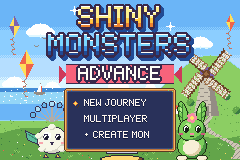
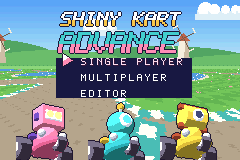
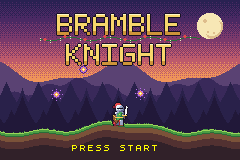
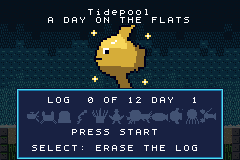
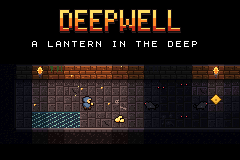
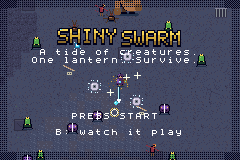
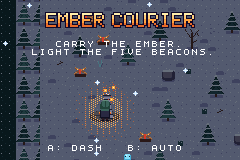
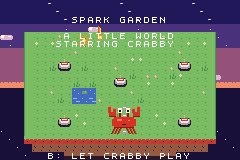
What you can make
Games that suit the machine work best: top-down adventures and RPGs, platformers and action games, puzzle games, shooters, racing on a rotating "Mode 7" floor, and calm little games, anything built from tiles and sprites. The GBA engine supports scrolling layers, sprites that rotate and scale, see-through effects, text boxes, music and sound effects, and a battery save, so a game remembers where you were.
Everything you make is an original game of your own, which makes Shiny Gen a way to make GBA homebrew without learning the toolchain first.
How it works: describe it, the agent builds it, you play it
- Open shinygen.ai/play (or the app) and sign up for a free account. Press +, choose New, then GBA Engine.
- In the Agent tab, describe the game: what the player does, the controls (D-pad, A, B, L, R, Start and Select), the goal and the look.
- The agent writes the game in a small C-like language, and Shiny Gen compiles it to ARM machine code on your own device. If a build fails, the compiler says where and why, and the agent fixes it.
- Then the agent plays it: it runs the cartridge, takes screenshots of the 240 x 160 screen, presses the keypad, reads back values the game reports, and fixes what is broken. It can make the sprites, backgrounds and music too; generating assets uses gems.
- Keep changing it by chat, or open the Code view and edit the code yourself, which costs nothing.
- Play it in the editor or from its card: on-screen controls on a phone or tablet, the keyboard or a game controller on a computer.
The game you play in the app is the cartridge itself, not a preview. The full walkthrough is in How to make a real Game Boy Advance game with AI.
Export a real .gba ROM for emulators and flash carts
Press Share, then Export .gba ROM. Exporting needs any one purchase, from a $2.99 starter pack. Shiny Gen rebuilds the cartridge, boots it in a fresh emulator to check that it starts, and gives you a .gba file named after your game.
- Emulators: any GBA emulator opens it, for example mGBA on a computer or Delta on an iPhone.
- Real hardware: copy it to a flash cart. We have played these ROMs on a real Game Boy Advance and a Nintendo DS Lite, saves included. The ROM declares a 128 KB (1 Mbit) flash save, so carts usually detect it on their own.
- Where the file goes: a download in a browser, the Save to Files sheet on iPhone and iPad. The Android app cannot save the file yet, so download it from a browser.
The ROM opens on a short Shiny Gen splash screen and does not carry your save, so a copy you give someone starts fresh. More in How to turn your game into a real ROM.
The hardware limits, plainly
- The machine's own limits. A 240 x 160 screen, up to 128 sprites at once (each at most 64 x 64 pixels), colors in palettes of 16, and 256 KB of working memory for your game's data. There is no floating point, so positions use fixed-point numbers. Every build reports how full each budget is.
- No 3D. A GBA draws 2D tiles and sprites. The Mode 7 floor gives racing games a 3D look, but it is a rotated and scaled 2D picture.
- New games only. It is not an emulator and not a ROM loader: it cannot play commercial or third-party ROMs, and you cannot import a ROM to edit.
- No link cable on hardware yet. Trading and battles between the Shiny Monsters games work over the internet inside Shiny Gen; a real link cable between two consoles is not proven.
GBA or Game Boy Color?
Pick GBA for a bigger screen, 16-color palettes, more and larger sprites, sampled sound and rotating floors. Pick Game Boy Color for the classic four-color look and chiptune sound: see the AI Game Boy Color game maker. Both work the same way, and so do the N64, GameCube and DS engines on the same screen.
What it costs
Free to make, play, and share. AI generation uses gems. Any one purchase, from a $2.99 starter pack, also unlocks exporting your games as files.
FAQ
Is there an AI that makes GBA games?
Yes. Shiny Gen is an AI GBA game maker: choose the GBA Engine, describe the game, and the AI agent writes the code, compiles a real Game Boy Advance cartridge, plays it with the keypad to find bugs, and fixes them. You play it free in the browser or app.
Is Shiny Gen a GBA game generator?
It generates a whole, playable GBA game from a description, and then you keep changing it: ask the agent for changes in chat, or edit the code yourself. It is a game you own, not a one-shot result.
Is it a real .gba ROM?
Yes. It is a standard .gba cartridge image compiled to ARM machine code, with a valid header. Shiny Gen boots every ROM in a fresh emulator before handing it over, and we have played these ROMs on a real Game Boy Advance and a DS Lite through a flash cart, saves included. Exporting it needs any one purchase, from $2.99.
Can it play commercial GBA ROMs?
No. The GBA engine is not an emulator and not a ROM loader. It compiles new games you make in Shiny Gen and cannot play commercial or third-party ROMs.
Do I need to know how to code?
No. You describe the game and the agent writes and tests the code. You can read and edit the code in the Code view if you want to, and editing by hand costs nothing.
What save type should I pick on my flash cart?
128 KB (1 Mbit) flash. The ROM declares it, so carts and emulators usually pick it up without asking.
Can I sell a GBA game I made?
Yes. You own what you make, and Shiny Gen takes no revenue share (Terms of Service, section 4). You can sell the ROM itself; exporting it needs any one purchase, from $2.99.
More: What is Shiny Gen? · AI game makers compared · Pricing · FAQ
Other guides: AI game maker · Make a game with AI · AI game engine · Godot AI · Shiny Gen vs Rosebud · Shiny Gen vs GDevelop · AI Game Boy Color game maker
From the blog: How to make a real Game Boy Advance game with AI · How to turn your game into a real ROM · How to make a Game Boy Color game with AI
Last updated: 2026-11-15