Rosebud AI alternatives in 2026: six tools, and when each is the better pick
Also in: Español · Deutsch · Français · Português · Italiano · Nederlands · Svenska · Norsk · Bahasa Indonesia · Türkçe · Polski · Tiếng Việt · Русский · 日本語 · 한국어 · 繁體中文
The best Rosebud AI alternative depends on what Rosebud is not giving you. For a game you can make and play on a phone, or a real Game Boy Color, Game Boy Advance or N64 ROM, try Shiny Gen. For a native build headed to Steam or the app stores, try SEELE or GDevelop. For casual games on a social feed, Astrocade. For a full engine you install, Godot with Cursor or Claude Code, or Unity. Rosebud stays a strong pick for a fast browser prototype shared by link.
Facts about each tool come from its own site, checked on 23 November 2026 and listed under Sources.
What Rosebud does, and why people look elsewhere
Rosebud is a browser platform for 2D games, 3D games built on Three.js and voxel worlds. Its assistant, Rosie, writes the code, art and music from a description, and you share the result as a link. It runs in a browser on Windows, Mac, Linux, Chromebooks and tablets, and some community games can be remixed.
What each Rosebud plan includes decides most of the searches for an alternative:
| Rosebud plan | Price a month | What it adds |
|---|---|---|
| Newbie | $0 | 10,000 credits a week, remix games, games hosted for you |
| Indie Dev | $15 | 100,000 credits a month, private projects, a code tab in the browser |
| 10x Dev | $30 | 300,000 credits, complete commercial rights, no Rosebud branding |
| Pro | $50 | 1,000,000 credits, downloadable project code, a Windows build for Steam |
| Scale | $100 | 2,000,000 credits, larger hosting |
So the common reasons to look elsewhere are:
- Commercial rights start at $30 a month, and downloadable code and a Windows build at $50.
- It makes browser games. The page names no native mobile build and no console file.
- Its 3D is Three.js, a renderer, so physics and game structure are written into each game's code.
- There is no app for making games on a phone. Rosebud runs in a tablet's browser; its iPhone app, Rosebud AI: Story Games, plays story games rather than making them.
The alternatives at a glance
| Tool | Best for | Where you make it | Commercial use | A file you keep | Free start |
|---|---|---|---|---|---|
| Shiny Gen | Phones, retro console ROMs, Godot games | Browser, iPhone, iPad, Android | Any plan, no revenue share | Web zip; GBA, GBC and N64 ROMs, .dol, .nds; exporting costs $25 per game, or comes with a plan | Free gems at signup |
| SEELE | Prompt-to-game with engine projects and store publishing | Browser | Pro plan or above | Projects for Unity, Unreal, Godot, Three.js | Free credits |
| GDevelop | A no-code engine with native builds | GDevelop editor | Publish to Steam and app stores; store builds on paid plans | Web, desktop, Android; iOS on Gold and Pro | 40 AI credits a month |
| Astrocade | Casual games on a social feed | Web and app | Creators earn based on plays | Games stay on Astrocade | Free |
| Godot with Cursor or Claude Code | A stock engine project on your computer | Desktop | Godot is free and open source | Godot's native builds | Godot free; Cursor has a free plan |
| Unity | Professional teams, any platform | Desktop editor | Personal free under $200,000 revenue | Native builds | Unity Personal |
Shiny Gen: if you want to make games on a phone, or a real retro ROM
Best for: making and playing games on an iPhone, iPad or Android device or in a browser, on a real engine, including real Game Boy Color, Game Boy Advance and N64 ROMs.
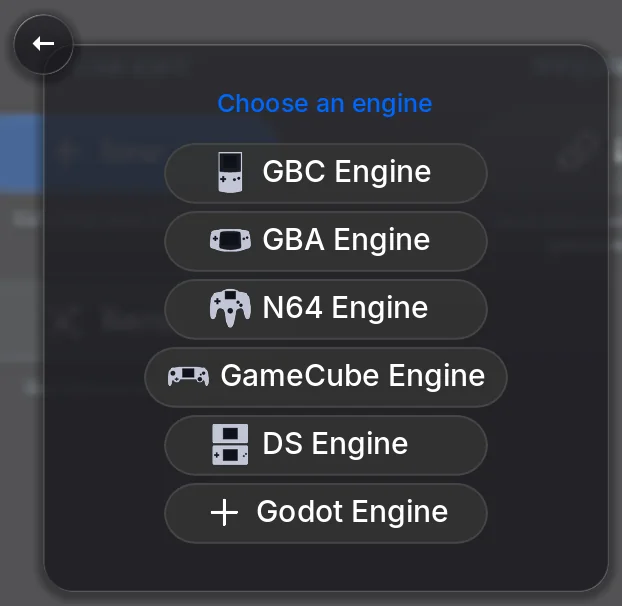
You describe a game and Shiny Gen's AI agent builds it, then plays it: it runs the game, takes screenshots, presses the controls, reads the errors and fixes them. You pick the engine when you start: the Godot engine, where the game is real GDScript, or one of five retro engines we wrote (GBA, GBC, N64, GameCube and DS), which compile a new game into a file you can download: a .gba, .gbc or .z64 ROM, a GameCube .dol or a DS .nds. We have played the GBA, GBC and N64 ROMs on real hardware through flash carts. The retro engines are not emulators and cannot play commercial ROMs.
How it differs from Rosebud:
- The app makes games, not just plays them. The iPhone, iPad and Android apps have the same engines and agent as the browser.
- You own what you make on any plan and may sell it; Shiny Gen takes no revenue share (Terms of Service, section 4). Exporting a game as a file, a web zip for itch.io or a ROM, costs $25 per game, or comes with a plan (1 new export game a month with Plus, 5 with Pro, unlimited with Max), and you can re-export that game any time.
- A whole engine instead of a renderer. Godot brings physics, scenes, input and audio, drawn with WebGPU in the browser.
- Your own AI can build too. A hosted MCP server lets Claude, ChatGPT or another assistant work in your live project, and the code it writes costs no gems.
Where Rosebud is ahead: Shiny Gen has no native desktop or app-store build of your game yet, and no download of the source as a project, while Rosebud's Pro plan gives a Windows build and the code. Making, playing and sharing are free; AI generation uses gems, and new accounts get free gems. See Shiny Gen vs Rosebud for the full side-by-side, and how to make a GBA game with AI.
SEELE: if you want a project for a desktop engine and the app stores
Best for: turning a sentence or an image into a 2D or 3D game that you then take into Unity, Unreal, Godot or Three.js.
SEELE says it builds a playable game in minutes and keeps editing it by chat, writes native projects for Unity, Unreal, Godot and Three.js, and publishes to Steam, the App Store, Google Play and its own Seele Game. The free plan includes credits to build, play and share. All plans share one currency, Koins, and commercial use needs an active Pro plan or above, so check the plan before you sell. Pick SEELE over Rosebud when the game has to end up in a desktop engine or a store.
GDevelop: if you want a free, open-source engine with native builds
Best for: a no-code 2D and 3D engine where you stay in control, with AI to help build features.
GDevelop builds games from visual events and ready-made behaviors, and its AI can build features or start a game for you. The free plan has 40 AI credits a month, unlimited web publishing and Android and desktop builds once a day; Silver adds publishing on Google Play, desktop and the web, and Gold adds iOS. It is a mature engine with a large community. Pick it over Rosebud when native builds matter more than prompt-first speed. See Shiny Gen vs GDevelop.
Astrocade: if you want an audience more than a file
Best for: casual games made in a few words, remixed and played on a social feed.
Astrocade has a free, ad-free feed of games on the web and in its apps (on iPhone since 2 November 2026), and you can describe a game to make one. Its blog says creating is free, it runs creator competitions, and since October 2026 an Astrocade MCP lets tools such as Claude Code, Cursor and ChatGPT make and publish games there. Games live on Astrocade: good for finding players, not for a file you keep.
Godot with Cursor or Claude Code: if you want a stock engine on your own computer
Best for: developers who want a standard Godot project, native builds and full control.
Godot is a free, open-source engine. With Cursor or Claude Code, the AI writes and refactors GDScript across your project, and local Godot MCP bridges let it drive the editor. You install the engine, find the art and sound, and test the game yourself, but you keep the stock editor, its addons and native builds for desktop and mobile. Cursor has a free plan; Claude Code comes with Claude's paid plans, from $20 a month ($17 billed yearly).
Unity: if you are building something big
Best for: professional teams shipping 2D, 3D, mobile and console games.
Unity is a professional desktop engine with an AI assistant in the editor (Unity 6 and later) and a free MCP server. It does not make a game from a prompt; you build in the editor and get builds for nearly every platform. Unity Personal is free under $200,000 in revenue and offers a free trial of the assistant that becomes a $10 a month subscription; Pro starts at $2,310 a year. If photoreal 3D is the goal, Unreal Engine is the other heavyweight.
When to stay with Rosebud
If you want a playable idea in one sentence and a link to share today, Rosebud is still one of the fastest ways to get there, and its free plan refills every week. It is a good fit for game jams, classroom projects and quick tests of an idea. Move when you need a phone app to make games in, a console file, a native build, or commercial use without a monthly plan: Shiny Gen allows it on any plan, and a game's file costs $25 once, or comes with a plan.
FAQ
What is the best alternative to Rosebud AI?
It depends on why you are leaving. Shiny Gen is the pick for making games on a phone and for real Game Boy Color, Game Boy Advance and N64 ROMs; SEELE and GDevelop for native builds and store publishing; Astrocade for a social audience; Godot or Unity for a full desktop engine.
Is there a free alternative to Rosebud?
Yes. Shiny Gen is free to make, play and share, with free gems for the AI at signup; exporting a file costs $25 per game, or comes with a plan. GDevelop has a free plan with 40 AI credits a month, Astrocade is free to use, SEELE has a free plan with credits, and Godot is free and open source.
Which Rosebud alternative lets me sell my game?
Shiny Gen allows commercial use on any plan and takes no revenue share; exporting the file you sell costs $25 per game, or comes with a plan. GDevelop publishes to Steam and the app stores, with store builds on its paid plans, and Godot is free and open source. On SEELE, commercial use needs Pro or above; on Rosebud, complete commercial rights start with the $30 10x Dev plan.
Is there a Rosebud alternative for iPhone or Android?
Shiny Gen has iPhone, iPad and Android apps that make games, not only play them, with the same engines and AI agent as the browser. Astrocade also has an app for its feed, on iPhone since November 2026.
Can a Rosebud alternative make a Game Boy or GBA game?
Shiny Gen can: pick the GBC, GBA or N64 engine and describe the game, and the AI compiles a real ROM and tests it. Downloading the ROM costs $25 per game, or comes with a plan. For Game Boy Color only, the ModRetro Chromatic Plugin for OpenAI Codex is the other option we found; see our comparison.
Sources
Checked on 23 November 2026, on each tool's own site.
- Rosebud: rosebud.ai (2D, Three.js 3D and voxel games, browser on Windows, Mac, Linux, Chromebooks and tablets, share by link, remix) and its pricing (the five plans above; commercial rights on 10x Dev; downloadable code and a Windows build for Steam on Pro); its iPhone app, Rosebud AI: Story Games, on the App Store.
- SEELE: seeles.ai: sentence or image to a 2D or 3D game, native projects for Unity, Unreal, Godot and Three.js, publishing to Steam, the App Store, Google Play and Seele Game, Koins, commercial use on Pro or above.
- GDevelop: gdevelop.io/pricing: 40 free AI credits a month, web publishing, Android and desktop on the free plan, iOS on Gold.
- Astrocade: its blog (the Astrocade MCP on 12 October 2026, the iOS app on 2 November 2026, free creation, the creator competition) and its creators page ("Earn based on plays").
- GDevelop: gdevelop.io: open-source no-code engine, publishing to Steam and the app stores.
- Godot: godotengine.org. Cursor: cursor.com/pricing. Claude Code: claude.com/pricing.
- Unity: Unity's AI tools and its pricing: Personal under $200,000, the assistant's trial converting to $10 a month on Personal, the free MCP server, Pro from $2,310 a year.
- Shiny Gen: pricing, what Shiny Gen is, Terms of Service section 4.
Tools change often; tell us about anything out of date at hello@shinygen.ai.