How to turn your game into a real ROM for emulators and flash carts
Also in: Español · Deutsch · Français · Português · Italiano · Nederlands · Svenska · Norsk · Bahasa Indonesia · Türkçe · Polski · Tiếng Việt · Русский · 日本語 · 한국어 · 繁體中文
To turn a game into a real ROM, make it in Shiny Gen on one of the cartridge engines (GBA, GBC, N64, DS or GameCube), open it, press Share, and press the export button for that engine, such as Export .gba ROM. Exporting needs any one purchase, from a $2.99 starter pack. Shiny Gen builds the file on your device, boots it in a fresh emulator to check that it starts, and hands it to you. The file plays in emulators, and Game Boy Advance and Game Boy Color ROMs play on real consoles through a flash cart.
Which file each engine makes
- GBA: a
.gbaROM. Plays in GBA emulators such as mGBA, or Delta on an iPhone. Tested on a real Game Boy Advance and a DS Lite through a flash cart. - GBC: a
.gbcROM. Plays in Game Boy Color emulators. Tested on a real Game Boy Advance and a ModRetro Chromatic through a flash cart. - N64: a
.z64ROM. Plays in N64 emulators; we test in ares. Not tested on real hardware yet. - DS: a
.ndsfile. Plays in DS emulators; we test in melonDS. Not tested on real hardware yet. - GameCube: a
.dolfile, or an.isodisc image for games with levels. Plays in Dolphin. Not tested on real hardware yet.
These engines compile new games you make in Shiny Gen. None of them is an emulator for other games or a ROM loader, and none can open commercial or third-party ROMs.
Step by step
1. Make the game on a cartridge engine
Press +, choose New, and pick an engine on Choose an engine: GBA Engine, GBC Engine, N64 Engine, GameCube Engine or DS Engine. Describe the game to the agent, and it writes, builds and playtests it.
A game made on the Godot Engine is not a ROM. It exports as a web game instead (a zip you can host anywhere) from Shiny Gen in a browser, which also needs any one purchase.
2. Press Share, then your engine's button
Open your game, press Share, and press the button for its engine: Export .gba ROM, Export .gbc ROM, Export .z64 ROM, Export .nds or Export .dol. The button is there for any game you own, in a browser and in the iPhone and iPad app. Exporting needs any one purchase, from a $2.99 starter pack; without one, the button takes you to the store.
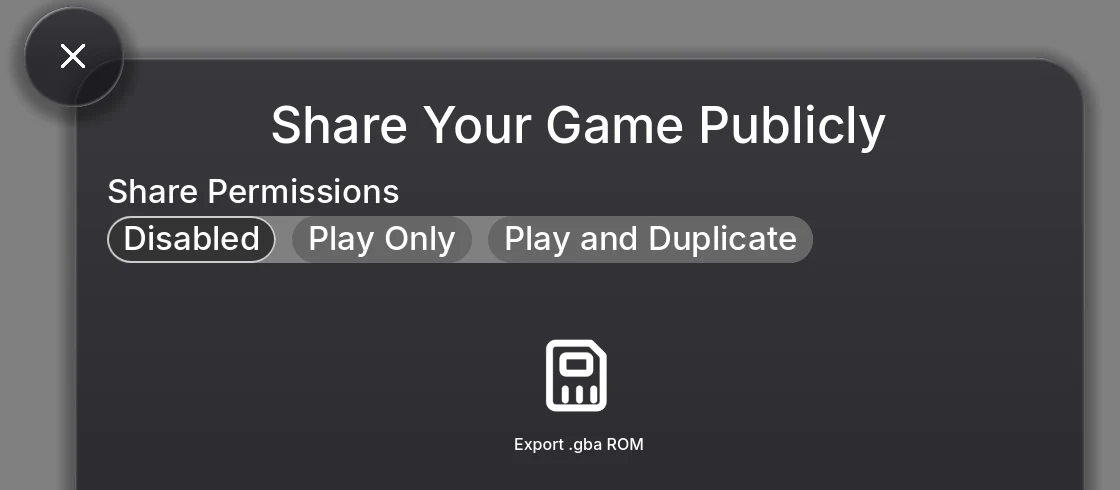
3. Get the file onto your device
Shiny Gen builds the cartridge from your game's current files, then boots it in a fresh emulator and checks that it comes up, so a file you are handed is a file that starts. Then:
- In a browser (computer or phone), it downloads like any file.
- In the iPhone and iPad app, the Save to Files sheet opens so you can keep it in Files or send it to an emulator app.
- In the Android app, the export button does not appear yet. Open the game at shinygen.ai in a browser on your phone or computer and export it there; it is the same account and the same one purchase.
The file is named after your game. GBA, GBC and N64 ROMs open on a short Shiny Gen splash screen.
4. Play it in an emulator
Open the file in an emulator for that machine. For example, mGBA on a computer or Delta on an iPhone for .gba and .gbc, melonDS for .nds, and Dolphin for .dol and .iso. Your save inside Shiny Gen is not in the file, so a copy you give someone starts fresh.
5. Play it on real hardware with a flash cart
A flash cart is a cartridge with a memory card slot. You copy ROM files onto the card, and the cart shows a menu of them when the console turns on. The general steps (your cart's manual has the exact ones):
- Copy the
.gbaor.gbcfile onto the cart's SD or microSD card. Some carts need their own system files on the card first. - Put the card in the cart and the cart in the console.
- Turn it on and pick your game.
If your cart asks for a save type:
- GBA ROMs use 128 KB (1 Mbit) flash saves and declare it inside the ROM, which is how carts and emulators usually detect it. If asked, choose 128 KB or 1M flash.
- GBC ROMs use a battery-backed save (32 KB) declared in the cartridge header, which carts and emulators read on their own.
We have played GBA and GBC ROMs made this way on real consoles (see the list at the top). N64, DS and GameCube files have not been tested on real hardware yet, so we do not claim them.
Try a ROM before you make one
Shiny Gen's own cartridge games, the ones in the catalogue such as Shiny Monsters Advance and Shiny Village Color, offer a Download ROM button under Share (for example Download .gba ROM) to anyone who is logged in, in a browser or the iPhone and iPad app, with no purchase. It is a good way to check your emulator or flash cart setup before you export your own game.
Limits
- Exporting needs any one purchase, from a $2.99 starter pack. Any purchase counts, once, for good.
- Only your own games. You can export games you own, with any one purchase. Shiny Gen's catalogue games offer Download ROM instead, and other players' games are not offered as files.
- No export in the Android app yet. Use a browser, with the same one purchase.
- No saves in the file. Your progress stays in your Shiny Gen account.
- Real hardware is proven for GBA and GBC only. N64, DS and GameCube files are tested in emulators.
- New games only. The engines cannot open, play or convert a ROM someone else made.
FAQ
Can I turn my game into a ROM?
Yes, if it is made on one of Shiny Gen's cartridge engines: GBA (.gba), GBC (.gbc), N64 (.z64), DS (.nds) or GameCube (.dol or .iso). Press Share, then the export button. Exporting needs any one purchase, from $2.99.
Can I put my game on a real cartridge?
Yes, with a flash cart for GBA and GBC games: copy the ROM onto the cart's memory card and play it on the console. We have tested that on a Game Boy Advance, a DS Lite and a ModRetro Chromatic.
What save type should I pick on my flash cart?
128 KB (1 Mbit) flash for GBA ROMs. GBC ROMs declare a 32 KB battery save in their header, which carts read on their own.
Do I own the ROM? Can I sell it?
Yes. You own what you make and may use it commercially (Terms of Service, section 4, Content), and Shiny Gen takes no revenue share. You can sell the ROM file itself; exporting it needs any one purchase, from $2.99.
Can Shiny Gen convert a game I already have into a ROM, or play a commercial ROM?
No. The engines compile new games you make in Shiny Gen. They cannot open, play or convert commercial or third-party ROMs.
Why is there no ROM button in the Android app?
The Android app has no way to hand you a file yet, so it does not show the export button. Open your game at shinygen.ai in a browser on the same phone or a computer, log in, and export it there with the same one purchase.